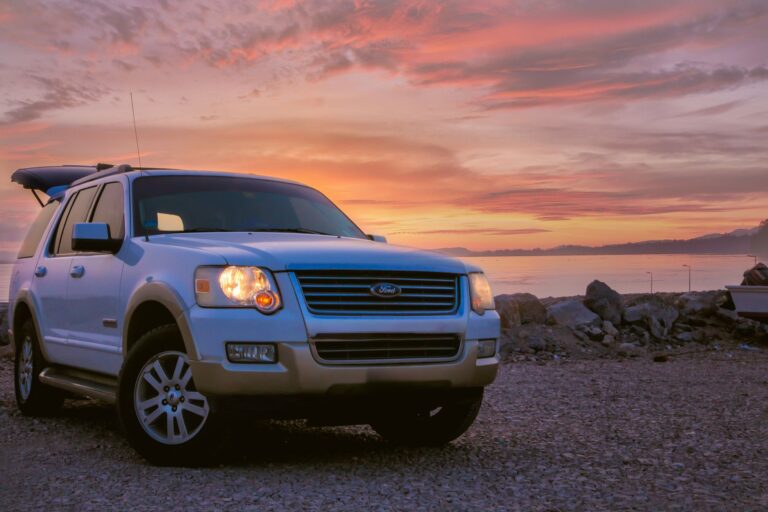

Getting work done in a parked car or a rolling fleet vehicle takes more than a laptop and a charger. You need a mount that matches your vehicle layout, your screen size, and how much reaching or twisting you’re willing to do during a long shift. The wrong setup feels awkward fast, while the right one keeps your laptop steady and your posture a lot happier.
This roundup focuses on mounts for commuters, mobile technicians, field staff, and anyone who uses a vehicle as a moving workspace. You’ll see compact options, heavy-duty setups, and a steering-wheel tray for quick stops, so you can match the mount to the way you actually work.
A Quick Look At The Shortlist
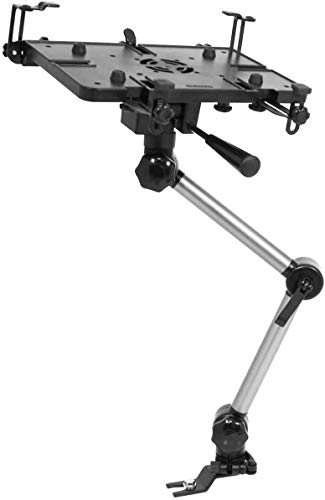
Mobotron MS-426 Standard Vehicle Laptop Mount

Mount-It! Car Laptop Mount, No-Drill Passenger Seat Laptop Stand

Mount-It! Car Laptop Mount, No-Drill Vehicle Laptop Stand

Car Laptop Mount Steering Wheel Tray Holder
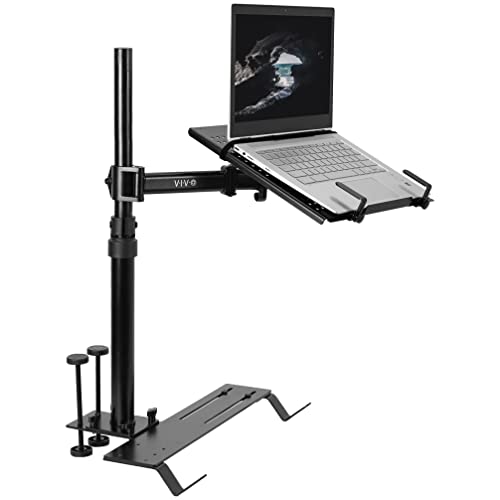
VIVO Single Laptop Car Mount, Fully Adjustable Extension

Mobotron MS-526B Heavy Duty Laptop Mount Holder

Truck Laptop Mount for Cars, Vans, Vehicles

AA-Products T-100AP Aluminum Vehicle Computer Mount Stand

Car Laptop Mount with 2 Cooling Fans
More Details On Our Top Picks
For a workday that stays close to one vehicle, the Mobotron MS-426 keeps things straightforward. The shape is plain, which helps here, because you’re not paying for extra parts you may never use. It suits drivers who want a stable laptop station without turning the cabin into a project.
The honest read is that a straightforward mount like this usually appeals more to routine use than to fancy repositioning. Compared with the passenger-seat style Mount-It! option, the MS-426 feels better suited to a fixed setup where you want fewer moving parts and less fiddling.
Strong Points
- Simple layout keeps the learning curve low.
- Compact hardware fits a work-focused cabin.
- Less moving hardware usually means fewer adjustments during the day.
- Better suited to drivers who leave a mount in place.
Things To Consider
- Not the most flexible choice for frequent re-positioning.
- Plain styling may feel basic next to newer designs.
- Fixed setups need careful placement the first time, so the arm lands where your hands expect it.
Core Details
Who It Suits Best
Drivers who want a simple, steady laptop perch for everyday route work fit this one well.
A Better Fit Elsewhere
Mount-It! Car Laptop Mount, No-Drill Passenger Seat Laptop Stand suits you better when passenger-side flexibility matters more than a fixed footprint.
This Mount-It! setup makes more sense for a cabin where the passenger seat is part of the workspace. The no-drill design is appealing because it avoids permanent changes, and the 12 to 15.4 inch laptop fit gives you a clear size window to work with. Up to 9 pounds is helpful context too, since it tells you this is aimed at portable machines, not oversized rigs.
You may find the passenger-seat layout easier to live with than steering-wheel trays like the DICMKY option, especially during longer parked sessions. The trade-off is that the system is shaped around a particular laptop size band, so ultra-large notebooks sit better in the next Mount-It! model.
What We Like
- No-drill installation suits leased or shared vehicles.
- Passenger-seat placement keeps the work area familiar and easy to reach.
- Height adjustment helps dial in a better viewing angle.
- The listed laptop size range makes fit easier to judge before you order.
Points To Note
- The laptop size window is narrower than some larger-duty mounts.
- Passenger-seat use can reduce flexibility for a front-seat passenger.
- Moving parts usually need a little more tightening and periodic checking.
Feature Snapshot
Who Should Grab It
Commuters and field workers using mid-size laptops in a passenger-focused setup are the best fit here.
Swap It Out When
Mount-It! Car Laptop Mount, No-Drill Vehicle Laptop Stand is the better call when you need room for a bigger notebook and a taller working range.
This version stretches further than the passenger-seat model, so it makes more sense for larger notebooks and broader reach. The adjustable height range of 14 to 22.25 inches gives you room to line up the screen in a taller vehicle cabin, and the cooling tray adds a useful surface detail for laptops that run warm during long sessions.
In a van, SUV, or truck, that extra vertical range can feel less cramped than the shorter Mount-It! pick above. The honest caveat is that bigger motion ranges usually ask for a more careful setup, so you’ll want to take a little time with placement and tightening.
Highlights
- Fits notebooks up to 17 inches, which broadens compatibility.
- The taller adjustment range helps in vehicles with more cabin height.
- Full-motion styling supports more position changes than simpler arms.
- Cooling tray adds a practical resting surface.
- Good match for drivers who keep a laptop in place for long blocks of time.
Small Caveats
- More motion parts can mean more setup time.
- The larger footprint may feel excessive in tight compact-cabin vehicles.
- The added tray is useful, but it also gives you one more surface to keep clean.
Details At A Glance
Right Fit For
Mobile workers with larger laptops and taller vehicle cabins get the most out of this setup.
Another Choice May Suit
Mount-It! Car Laptop Mount, No-Drill Passenger Seat Laptop Stand fits better for smaller notebooks and a more compact cabin layout.
This steering-wheel tray is built around short, parked work sessions rather than a permanent cabin workstation. The five-position height adjustment matters more than it sounds, because it lets you move the surface closer to a comfortable line for your neck and lower back during quick admin tasks. Foldable storage also helps here, since a tray like this is easier to stash than a larger arm mount.
Compared with the Mobotron and Mount-It! mounts above, this one is less about long-haul stability and more about convenience at the stop. You may find it handy in a Tesla, SUV, truck, or any vehicle where you want a temporary desk feel without a full installation.
Bright Spots
- Foldable format makes storage simple.
- Five height positions help you tune the work surface.
- Useful for writing, checking notes, or brief laptop tasks.
- Easy to move between vehicles compared with fixed arm systems.
Areas To Watch
- Best suited to parked use, not active driving.
- The steering-wheel format won’t suit every cabin shape.
- Frequent folding and unfolding usually means more attention to hinges and contact points.
Core Details
Who Will Love This
Drivers who mostly work from a parked vehicle and want a quick surface for short tasks fit this tray well.
Look Elsewhere When
VIVO Single Laptop Car Mount, Fully Adjustable Extension suits you better when you want a more permanent, articulated laptop position.
The VIVO MOUNT-CAR01 leans into adjustability, which is exactly what some vehicle workspaces need. Articulation and height adjustment give you room to position the screen more carefully than a tray-style option, so it suits longer sessions where small comfort changes matter. It also fits trucks, vans, and SUVs, which keeps it in the same general lane as the heavier Mount-It! and MELIPRON choices.
That extra flexibility can feel like a real upgrade in a vehicle with a taller or less conventional seating position. The trade-off is predictable, more joints usually mean more parts to set and re-check, so it rewards someone who doesn’t mind a more deliberate install.
Reasons To Buy
- Fully adjustable extension gives you more placement options.
- Articulation helps line up the laptop more naturally.
- Works across trucks, vans, and SUVs.
- Good fit for users who spend long stretches at the screen.
- Black finish keeps the look simple and work-focused.
Softer Spots
- More adjustment points can take longer to dial in.
- Single-arm styles may feel less broad than tray-based setups.
- Routine tightening checks make sense with any articulated mount.
Technical Sheet
Whose Shelf It Belongs On
Drivers who want fine positioning and a cleaner one-arm setup will appreciate this mount most.
Reach For A Different Pick When
AA-Products T-100AP Aluminum Vehicle Computer Mount Stand is the better match for shoppers who want a more material-forward aluminum build in a simpler profile.
The MS-526B is for vehicles that need a sturdier, more fully equipped laptop station. The complete accessory package is the clue here, because that usually matters most to someone who wants a ready-to-build workstation rather than a bare-bones mount. Compared with the MS-426, this version reads as a stronger fit for heavier-duty use and a broader vehicle mix.
One thing worth considering is how much setup space you have before you add accessories around it. In a work truck or SUV, that extra structure can feel useful, but in a tighter cabin it can take more planning than the simpler Mobotron model above.
Best Bits
- Accessory package gives you more parts to build around.
- Better suited to cars, trucks, and SUVs with a work role.
- Heavy-duty positioning helps it fit tougher daily use.
- Good option for drivers who want a more complete setup out of the box.
Honest Caveats
- More hardware can mean more time spent planning the install.
- Heavier-duty setups often feel less minimal in compact cabins.
- Accessory-rich designs usually need more storage space when not in use.
Feature Rundown
Made For
Work truck and fleet users who want a more complete mounting kit are the strongest match for this model.
A Better Fit Elsewhere
Mobotron MS-426 Standard Vehicle Laptop Mount is the cleaner choice for simpler daily use and less cabin clutter.
This MELIPRON mount leans into work posture more than most of the other picks here. Adjustable height plus full-motion swivel give you a lot of room to correct screen angle, which is useful during long shifts in a van or truck. The no-drill approach also makes the setup less intimidating for vehicle owners who want a mounted laptop without permanent changes.
Compared with the VIVO mount, this one feels more like a utility-first workstation and less like a single-arm layout with a cleaner silhouette. The catch is that the more motion you get, the more attention you usually give to alignment and tightening during installation.
Standout Traits
- Adjustable height supports different seating positions.
- Full-motion swivel gives the screen more usable angles.
- No-drill install keeps the vehicle intact.
- Heavy-duty framing suits work vans and trucks.
- Good fit for long work blocks where posture matters.
Worth Noting
- More articulation usually means more setup time.
- Utility-first styling may feel plain if you want a cleaner interior look.
- Swivel points benefit from periodic checking after repeated use.
Spec Overview
Built With In Mind
Drivers who want a work-first laptop station for long hours in a truck or van fit this model well.
Where A Sibling Pick Shines
VIVO Single Laptop Car Mount, Fully Adjustable Extension is the better match if you want a less industrial-looking setup with a single-arm feel.
The AA-Products T-100AP stands out for one simple reason, aluminum usually gives a mount a cleaner, more purpose-built feel. That matters in a car, SUV, van, or truck where you want the setup to feel solid without looking bulky. It also spans tablets, laptops, and ultrabooks, so it works for a mixed-device workflow rather than just one screen size.
That versatility is useful for mobile teams, though the broader device range can also mean you need to think carefully about fit before you settle on a setup. Compared with the heavier-duty MELIPRON and Mount-It! models, this one feels a little more streamlined and a little less complex.
Upsides
- Aluminum construction tends to suit a cleaner work vehicle look.
- Works with tablets, laptops, and ultrabooks.
- Broad vehicle compatibility expands where you can use it.
- Straightforward profile makes the setup feel less crowded.
Minor Gripes
- Mixed-device compatibility means fit planning matters.
- Streamlined mounts may offer less dramatic movement than bulkier workstation arms.
- Aluminum surfaces can show scuffs, so a soft cloth now and then helps keep things tidy.
Feature Card
Perfect Match For
Shoppers who want a cleaner aluminum mount and may switch between devices benefit most from this pick.
Skip It When
Mount-It! Car Laptop Mount, No-Drill Vehicle Laptop Stand makes more sense for users who want bigger-screen support and a taller motion range.
The two cooling fans are the big story here, especially for laptops that run warm during long mobile sessions. That kind of airflow support matters in a parked vehicle where cabin heat and sustained use can stack up, and the no-drill aluminum build keeps the mount in the same practical lane as the sturdier truck-focused options above. It feels aimed at work-on-the-go setups that need a little more thermal breathing room.
Compared with the AA-Products stand, this one adds active airflow rather than just a streamlined structure. The trade-off is obvious, more features usually mean more parts to think about, so you’ll want to value the cooling angle enough to justify the extra complexity.
Best Bits
- Two cooling fans help support warmer-running laptops.
- Heavy-duty aluminum gives the mount a serious work feel.
- No-drill design suits vehicles you want to keep unchanged.
- Useful for longer sessions where heat buildup becomes noticeable.
Room For Improvement
- Cooling hardware adds another element to maintain and clean.
- Feature-heavy designs can feel more involved than simple mounts.
- Cooling is useful, but it’s only worth paying attention to if your laptop actually runs warm in the vehicle.
Quick Facts
Who Should Grab It
Drivers who run laptops for long stretches and want extra airflow support should look closely at this mount.
A Better Fit Elsewhere
AA-Products T-100AP Aluminum Vehicle Computer Mount Stand is a better match if you want a simpler aluminum setup without the cooling hardware.
How To Choose The Right Laptop Mounts For Vehicle
Start With The Vehicle, Not The Laptop
Your cabin layout decides more than people expect. A truck with a broad center area can handle a heavier arm or a taller post, while a passenger-seat setup makes more sense in a sedan or crossover with tighter reach lines.
Mount style matters too, because a no-drill design protects the vehicle but still needs enough clearance around seats, consoles, and doors. A steering-wheel tray is a different animal altogether, since it’s for parked use and short tasks rather than a permanent workstation.
Match Motion To The Way You Work
Full-motion arms help when you shift between typing, reading maps, and checking notes. They also let you fine-tune the screen angle, which becomes valuable on long routes or in a seat that sits a little higher than usual.
That flexibility carries a trade-off, though, because more joints usually mean more setup time and more points that may need periodic tightening. A simpler mount often feels calmer day to day, especially for drivers who leave everything in one position.
Check Size, Weight, And Surface Support
Laptop size range should be one of your first filters. The Mount-It! passenger-seat model is aimed at 12 to 15.4 inch laptops up to 9 pounds, while the larger Mount-It! vehicle-and-truck version reaches up to 17 inches, so the difference is real.
Surface support matters just as much. Cooling trays, tablet surfaces, and flat desks all solve slightly different problems, and the right one depends on whether your work involves long typing sessions, short admin stops, or mixed-device use.
Think About Install Time And Daily Maintenance
Some mounts feel close to plug-and-place, while others ask for a more deliberate install. That’s normal in this category, because a sturdier workstation usually brings more hardware, more adjustment points, and a little more time with the wrench.
Maintenance stays simple, but it should not be ignored. A quick check on screws, swivel points, and contact surfaces helps keep the mount steady, and a wipe-down matters for aluminum, trays, and any area that sees coffee, dust, or road grime.
Things Worth Knowing First
Mistakes Worth Dodging
The biggest miss is choosing by laptop size alone. You still need to think about cabin width, seat travel, and how much room your elbow has once the mount is in place.
Another common slip is buying a highly adjustable arm for a task that only needs a simple parked desk. In that case, a tray-style option may feel easier to live with and faster to store.
The Upgrade Payoff
Higher-tier mounts usually cost more because they use stronger materials, more articulation, or extra pieces like cooling fans and accessory kits. That extra hardware can make sense for mobile technicians, fleet drivers, and anyone who logs long hours in the vehicle.
Spending more pays off when your laptop is part of your workday, not just an occasional backup screen. For occasional note checks or short parking-lot sessions, a simpler mount usually gets the job done without extra bulk.
Frequently Asked Questions
What size laptop works best in a vehicle mount?
Match the mount to your exact laptop width and weight before anything else. A model with a stated range, like 12 to 15.4 inches or up to 17 inches, gives you a clearer fit target.
Are no-drill mounts better for leased vehicles?
No-drill designs are easier to live with in a leased or shared vehicle because they avoid permanent changes. You still need to check clearance around seats, doors, and the center area.
Do steering-wheel trays work for full work sessions?
They’re better for parked use and short tasks than for long typing blocks. A fixed arm mount usually feels steadier for extended laptop work.
Why do some vehicle laptop mounts have cooling fans?
Fans add airflow when a laptop runs warm during long sessions or in a hot cabin. That feature matters most for work blocks that stretch out over time.
What matters more, material or adjustability?
Both matter, but in different ways. Aluminum or heavy-duty hardware helps the mount feel steady, while adjustability shapes how comfortably you can use it every day.
Closing Thoughts
The right laptop mount depends on how you use your vehicle, not just how big your screen is. A simple fixed mount works well for routine route work, while taller articulated options fit larger cabins and longer sessions. Tray-style designs make sense for short parked tasks, and cooling features earn attention only when your laptop actually needs them. Pick the shape that matches your day, and the cabin starts feeling a lot more like a usable workspace.