
You want a stereo that fits your dash, pairs fast, and makes daily driving less fiddly. That matters just as much on a work commute as it does in an older car that never got modern phone support. The six picks below cover simple Bluetooth receivers, screen-based upgrades, and full double-DIN setups, so you can match the unit to your car instead of forcing the car to adapt.
Quick Look At Our Shortlist
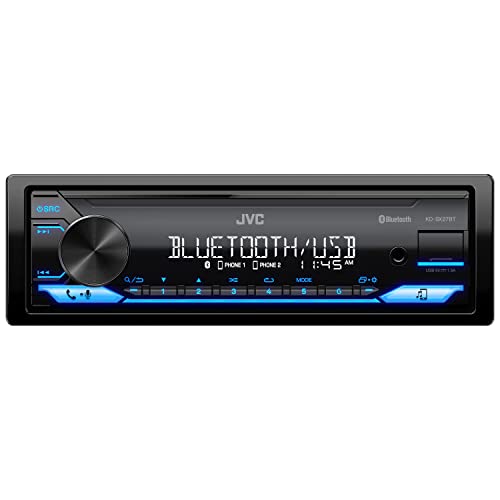
JVC KD-SX27BT Digital Media Receiver

Pioneer MVH-S230BT 1-Din Car Stereo

Sobalai Wireless CarPlay Android Auto 6.9-Inch Stereo

Pioneer MVH-S110BT 1-Din Digital Media Car Stereo

Kissound 7-Inch Double Din Car Stereo

Kissound 7-Inch Double Din Stereo with USB-C
More Details On Our Top Picks
For a car that still needs a clean, modern audio center without a screen taking over the dash, this JVC keeps the job straightforward. The single-DIN format is friendly to older vehicles, and the 13-band EQ gives you more room to shape sound than a bare-bones unit.
The dual phone connection is handy for shared cars, especially for households that swap drivers during the week. The 1.5A USB port helps with everyday charging needs, though it won’t feel as roomy as the higher-feature screen units later in this list.
Strong Points
- 13-band EQ lets you fine-tune bass, mids, and treble with more precision.
- Dual phone pairing suits two-person households that alternate drives.
- Single-DIN sizing makes it a practical fit for many older dashboards.
- USB, AUX-in, AM/FM, and Bluetooth keep source choices simple.
- The JVC Remote app adds control from a phone, which helps in daily use.
Things To Consider
- No touchscreen, so this is a control-first stereo rather than a media hub.
- The charging port is modest, so it suits basic top-ups more than fast replenishment.
- Drivers who want navigation on the head unit may prefer a screen model instead.
Feature Snapshot
Who It Suits Best
You should look here for an older car, a commuter setup, or a daily driver where clear controls matter more than a large display.
A Better Fit Elsewhere
The Sobalai wireless CarPlay and Android Auto unit suits you better if you want touchscreen navigation and a more app-heavy cabin.
This Pioneer feels like the clean middle ground in the list, especially for someone who wants Bluetooth and USB without extra screen complexity. The front layout keeps daily plug-ins easy, and the selectable RCA output adds flexibility for a modest system upgrade.
Compared with the JVC above, it leans more toward straightforward hardware than app-driven control. That trade-off makes sense in a work truck, a second car, or any ride where you just want dependable playback and call handling.
Upsides
- 50W x 4 output supports a sensible four-speaker setup.
- Front USB access makes cable swaps quick and low fuss.
- Selectable RCA output gives you room to build a small amp path later.
- AM/FM radio and Bluetooth cover everyday listening well.
- iPhone and Android support broadens compatibility across households.
Room For Improvement
- No large display, so this is aimed at function rather than visual flair.
- The mono selectable output is useful, though it may feel basic for a more ambitious sub setup.
- Installers who want a richer interface may lean toward the Sobalai touch model.
Core Details
Whose Shelf It Belongs On
This suits you best if you want a no-drama upgrade for an older car, a fleet vehicle, or a second ride that needs modern phone pairing.
Another Choice May Suit
The JVC KD-SX27BT gives you stronger app support and deeper EQ control, which makes more sense for drivers who like to fine-tune sound.
Screen-heavy setups change the whole feel of a cabin, and this Sobalai is built for that kind of upgrade. Wireless Apple CarPlay and Android Auto take center stage, so your maps, calls, and music can sit in one place instead of bouncing between apps.
The 6.9-inch UHD touchscreen gives you a larger surface for day-to-day taps, which helps in stop-and-go traffic. It also adds a backup camera and USB Type-C fast charging, though the trade-off is more installation effort than the simpler single-DIN receivers above.
Bright Spots
- Wireless CarPlay and Android Auto reduce cable clutter.
- 6.9-inch touchscreen gives you a roomy, modern control surface.
- Backup camera support adds a real parking convenience.
- USB Type-C fast charging is useful for newer phones on long drives.
- SWC support helps keep steering wheel controls part of the setup.
Points To Note
- Installation is more involved than with a basic media receiver.
- The larger screen may feel like more than you need in a simple commuter car.
- Drivers who only want radio and Bluetooth may find Pioneer or JVC easier to live with.
Feature Rundown
Built With In Mind
You should focus on this pick for a newer-cars-feel upgrade, especially in a daily driver where maps and phone mirroring matter.
Skip It When
The Pioneer MVH-S230BT suits you better if you want a quicker install and a simpler layout with fewer screen-based distractions.
Some cars only need the basics done well, and that’s where this Pioneer lands. It keeps Bluetooth, USB, and AM/FM in a compact 1-DIN body, so you can modernize the dash without overcomplicating the install.
Compared with the Sobalai screen unit, this one is the calmer option for anyone who values quick access and a cleaner faceplate. The front and subwoofer RCA outputs also leave room for a modest audio add-on later, which is useful for hobbyists building in stages.
Best Bits
- Compact receiver shape works well in many older vehicles.
- USB input keeps music and charging routines simple.
- 50W x 4 output supports a standard speaker refresh.
- Front and subwoofer RCA outputs help with future expansion.
- iPhone and Android compatibility keeps it broadly useful.
Small Caveats
- No display-first interface, so you trade visuals for simplicity.
- The feature set is lean compared with the touchscreen units below.
- Drivers who want camera integration or phone mirroring should look elsewhere.
Details At A Glance
Right Fit For
This fits a driver who wants a tidy Bluetooth upgrade with minimal fuss and a setup that stays easy to live with.
Where A Sibling Pick Shines
The JVC KD-SX27BT makes more sense if you want deeper equalizer control and dual phone pairing in the same style of unit.
A 7-inch double-DIN screen changes the whole center stack, so this Kissound makes the strongest visual jump in the group. Wireless Apple CarPlay and Android Auto keep phone use tidy, while the 240W rating points toward a setup with more headroom than the slim single-DIN choices.
That extra space is useful in a family vehicle or a project car where you want the dash to feel more current. The subwoofer output and backup camera support add practical value, though the install makes more sense for someone comfortable with a bigger retrofit.
Reasons To Buy
- 7-inch touchscreen gives you a roomy interface for media and navigation.
- Wireless phone integration reduces cable clutter during daily drives.
- 240W output suggests more breathing room for a stronger audio setup.
- Subwoofer output helps if you plan a deeper bass system later.
- Backup camera support adds convenience in crowded parking lots.
Areas To Watch
- Double-DIN fitment can rule out some older dashboards.
- The larger screen adds installation complexity compared with the JVC and Pioneer units.
- Its feature set can feel more ambitious than necessary for basic radio replacement.
Feature Card
The Right Fit
This suits you best in a dash that already accepts double-DIN gear and for a driver who wants a visible, modern interface.
Look Elsewhere When
The Pioneer MVH-S230BT is the easier fit for a tighter budget of attention, especially in a car where you want fast installation and fewer bells and whistles.
This Kissound model covers the same 7-inch double-DIN idea as the unit above, but it broadens the connection options in a way that feels more flexible for day-to-day use. USB-C, AUX, and TF support make it easier to work with mixed media sources, which suits drivers who keep older files and newer phones in the same car.
Because it includes Mirror Link and backup camera support, it leans toward a more complete dash refresh. The honest read is that it makes the most sense for someone who wants several input paths without moving up to a much more complex system.
Positives
- USB-C, AUX, and TF support give you more ways to connect devices.
- Wireless phone mirroring keeps the cabin less cable-heavy.
- 7-inch screen size makes everyday menu use easier to see.
- Subwoofer output supports a more complete audio path.
- Backup camera support adds another layer of parking convenience.
Honest Caveats
- Double-DIN sizing still requires the right dash opening.
- The extra inputs are useful, though casual drivers may not use every one.
- Owners who want the leanest setup may prefer the simpler Pioneer MVH-S110BT.
Spec Overview
Who Will Love This
You should focus on this pick for a family vehicle, a commuter with mixed devices, or a dash refresh that needs several connection types.
Swap It Out When
The Kissound double-DIN model with the simpler front panel suits you better if you care more about a cleaner interface than extra connection options.
How To Choose The Right Bluetooth Auto Stereos
Match The Stereo To The Dash
Start with the opening in your vehicle, because 1-DIN and double-DIN are not interchangeable. A 1-DIN receiver, like the JVC or both Pioneers, suits many older cars with a narrow slot, while the Kissound units and the Sobalai screen need a wider double-DIN or screen-ready setup.
That sizing choice affects more than fit, it shapes the whole interface you live with every day. A smaller receiver keeps things simple, while a larger touchscreen gives you room for maps, camera views, and bigger buttons.
Decide How Much Control You Want
Bluetooth alone solves audio streaming and hands-free calling, but some units stop there and others go much further. The JVC adds a 13-band EQ, which means you can shape sound more precisely, while the Sobalai and Kissound models add phone mirroring that places navigation and media on the screen.
That difference matters most in real driving, not on a spec sheet. Commuters who want quick, distraction-light operation may prefer a lean stereo, while drivers who rely on on-screen maps benefit from the extra interface space.
Think About Inputs, Outputs, And Future Upgrades
USB, AUX, RCA, and subwoofer outputs each solve a different problem. USB and AUX keep playback flexible, RCA outputs help when an amp enters the picture, and subwoofer outputs matter for anyone building out bass later.
The Pioneer MVH-S230BT and MVH-S110BT keep the approach restrained, which is fine for a straightforward speaker refresh. The Kissound models give you more headroom for a fuller system, though that can also mean more wires and a slower install.
Balance Convenience Against Installation Effort
The cleanest everyday choice is not always the most feature-rich one. A single-DIN deck is usually easier to place and live with, while a screen unit can feel more polished but asks more from the installer and from your patience during setup.
That trade-off is the heart of this category. Drivers who want fast pairing and dependable radio playback can keep things modest, while families or tech-heavy cabins often justify the larger screen because the extra control pays off in daily use.
A Quick Reality Check
Mistakes Worth Dodging
One common mistake is buying for features before checking the dash opening. Another is overlooking output layout, which can leave you short on the connections needed for an amp or sub later.
It also helps to think past the first week of ownership. A touchscreen looks appealing, but a simpler receiver can be easier to clean, faster to use with gloves, and less demanding in a work truck or older commuter.
The Upgrade Payoff
More expensive units usually cost more because they add screen size, phone mirroring, camera support, stronger output options, and broader connection paths. Those extras matter most in vehicles you drive every day, especially when your phone is your map, music source, and call hub.
Paying up makes the most sense for a family car, a long commute, or a dash refresh where you want fewer compromises. For a second car or a basic commuter, the simpler JVC or Pioneer units already cover the essentials without crowding the dash.
Frequently Asked Questions
What size stereo fits most older cars?
Many older vehicles use 1-DIN openings, so the JVC and Pioneer single-DIN units are common fits. Double-DIN screens need a wider opening or a dash kit that supports them.
Do I need a touchscreen for Bluetooth use?
No, Bluetooth playback and calling work fine on button-based receivers. A touchscreen mainly helps when you want maps, backup camera visuals, or phone mirroring.
Is USB enough for charging during a commute?
USB is useful for everyday top-ups, especially on shorter drives. The JVC’s 1.5A port is fine for basic use, but it is not the same as a high-output charging setup.
Which option suits a simple sound upgrade?
The Pioneer MVH-S230BT and MVH-S110BT make sense for a clean, uncomplicated refresh. They keep Bluetooth, radio, and USB front and center without adding screen complexity.
Which stereo makes sense for a full dash refresh?
The Kissound double-DIN units and the Sobalai touchscreen fit that role better. They add larger displays, camera support, and phone mirroring, which feels more complete in a modernized cabin.