
Choosing the right stereo changes how your car feels on weekday commutes, school runs, and long highway stretches. Some setups keep things simple with Bluetooth and USB, while others add touchscreen navigation, camera support, or phone mirroring that suits a busier dashboard. The right match depends on your vehicle’s dash size, your music habits, and how much control you want at the wheel.
That’s why this shortlist leans on practical use, not gadget glitter. You’ll see compact single-DIN units, larger double-DIN screens, and a few models that suit drivers who want stronger audio control or easier phone integration. The trade-off is straightforward, more features usually means more setup and a bit more complexity.
The Shortlist At A Glance

Kissound Double Din Car Stereo 7″ HD Touchscreen

JVC KD-SR87BT Single DIN Car Stereo

Wistrue Single Din Car Stereo Bluetooth Type-C/USB

Sobalai Single Din Radio Car Stereo 6.9″ UHD Screen
LSLYA Single Din Car Stereo Wireless CarPlay 240W

Sony DSX-A410BT Single DIN Bluetooth Media Receiver

Pioneer DMH-130BT 6.8″ Capacitive Touchscreen
More Details On Our Top Picks
That 7-inch touchscreen gives this Kissound unit a more modern feel than the smaller, button-first radios farther down the list. Wireless phone integration is the big draw here, since it cuts the cord clutter that builds up in daily commuting and short errand runs.
The 240W output and subwoofer output make sense for drivers who want a fuller cabin sound without jumping to a separate amplifier right away. The trade-off is setup complexity, especially in vehicles where the dash layout or steering-wheel controls need extra attention.
What We Like
- Wireless Apple CarPlay and Android Auto keep phone access simpler on busy drives.
- The 7-inch display gives you a larger touch target than the single-DIN media decks here.
- Subwoofer output suits systems that need more low-end control later on.
- Steering wheel control support helps keep hands on the wheel during routine use.
- Mirror link support adds another path for screen sharing in mixed-use setups.
Points To Note
- Double-DIN fitment needs the right dash opening, so installation planning matters.
- The richer feature set can feel busy in older vehicles with simpler wiring.
- Touchscreen surfaces usually need regular wiping in dust-heavy cabins.
Feature Rundown
Who It Suits Best
Drivers who want a touchscreen-first setup with wireless phone mirroring and room for future audio upgrades will get the most from it.
A Better Fit Elsewhere
Pioneer DMH-130BT fits better for drivers who want a more established multimedia receiver with a shorter chassis and a tighter dash-friendly profile.
CD support makes this JVC a comfortable fit for anyone who still has a disc stack in the glovebox or prefers a familiar playback format. Compared with the touchscreen-focused Kissound, this one feels more old-school, but the high-contrast LCD and physical layout can be easier to live with on rough roads.
Dual phone connection is useful in shared cars, especially when two drivers rotate through the same daily commute. The honest read is that it gives up the bigger-screen convenience of the double-DIN models, yet it returns a cleaner dashboard for compact vehicles.
Highlights
- Built-in CD playback supports a format many newer decks leave out.
- Dual phone pairing works well in shared vehicles.
- The 13-band EQ gives you more room to shape the sound.
- USB and AUX inputs keep older and newer sources usable.
- High-contrast LCD is easier to read than dimmer, busier displays.
Room For Improvement
- Single-DIN format leaves less room for screen-based navigation.
- It lacks the broad phone mirroring style found on the touchscreen units here.
- Disc playback adds moving parts, so dusty storage habits matter.
Technical Sheet
Who Will Love This
Drivers who still use CDs and want a straightforward dash layout will find this JVC easy to live with.
A Better Fit Elsewhere
Sony DSX-A410BT suits commuters who want a simpler media-only deck without a disc mechanism.
This Wistrue unit keeps things lean, which is useful in older cars where a simple radio swap is all you want. The Type-C and USB ports bring it closer to modern phone charging habits, while the FM and AM support still covers everyday radio listening.
Compared with the JVC above, it skips the disc drive and large EQ layout, so the face stays cleaner and the learning curve stays mild. For short commutes or a second car, that stripped-back approach can feel like the right amount of tech.
Positives
- Type-C support helps match newer charging cables.
- Two USB ports plus AUX give you flexible playback options.
- Bluetooth hands-free calling keeps basic commutes more manageable.
- FM and AM radio preserve local station listening.
- The simple layout should suit drivers who want fewer menus.
Minor Gripes
- It does not bring the screen-based convenience of the touchscreen picks.
- The no-disc design may not suit anyone holding onto CDs.
- Radio presets depend on correct wiring and saved settings, so setup matters.
Core Details
Whose Shelf It Belongs On
Drivers who want a no-frills replacement radio for daily errands and local station listening will get along with it.
Swap It Out When
Kissound Double Din Car Stereo 7″ HD Touchscreen makes more sense for drivers who want screen mirroring and a larger interface.
The 6.9-inch UHD screen pushes this Sobalai unit into a more polished, phone-led style of use than the smaller radio-first decks. Wireless CarPlay and Android Auto keep navigation, messages, and music close at hand, which helps in cars that see a lot of weekday traffic.
USB-C fast charging is a practical touch for drivers who rely on a phone all day, though the real advantage still comes from the broader touchscreen package. It sits between the simpler Wistrue radio and the more audio-focused LSLYA, so your choice here depends on whether convenience or output matters more.
Upsides
- Wireless CarPlay and Android Auto reduce cable clutter.
- The 6.9-inch screen is a useful step up for touch control.
- 1080P backup camera support helps round out daily parking use.
- USB-C fast charging suits heavy phone use on longer drives.
- Steering wheel control support keeps core functions within reach.
Areas To Watch
- Single-DIN fit means dash compatibility needs a quick check.
- More functions can mean more setup time during installation.
- Touch screens benefit from regular cleaning in dusty cabins.
Details At A Glance
Best Suited To
Commuters who want a screen-led stereo with wireless phone integration and camera support will feel right at home with it.
Another Choice May Suit
LSLYA Single Din Car Stereo fits better for drivers who want more audio routing options and stronger low-end connection points.
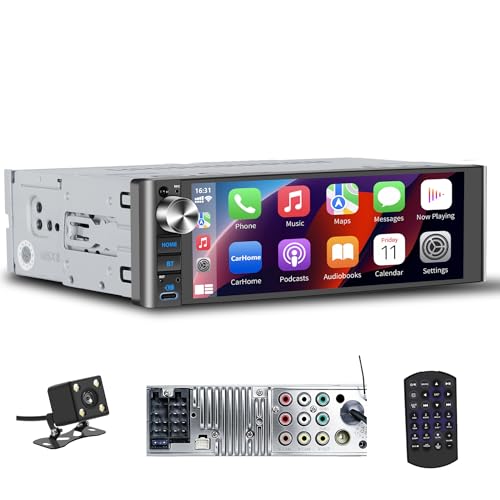
This LSLYA model leans hard into audio routing, which is what makes it stand out beside the Sobalai screen unit. Wireless CarPlay and Android Auto are here too, but the two subwoofer ports and 4-channel RCA support are the parts that matter most for a more layered system.
The trade-off is plain: you get more signal flexibility, yet the install can feel more involved than a simpler Bluetooth radio. Drivers building a sound-focused setup in a standard single-DIN opening will probably find that worth the effort.
Reasons To Buy
- Two subwoofer ports give extra room for low-end expansion.
- Four-channel RCA support helps with broader system connections.
- Wireless CarPlay and Android Auto keep phone use modern.
- SWC support lets steering wheel buttons stay useful.
- USB and Type-C inputs add flexible front-panel access.
- 240W output suits drivers who want stronger head-unit energy.
Small Caveats
- The extra output paths can make wiring more involved.
- Front and backup camera setup may take patience in mixed dash layouts.
- More ports also mean more cables to keep tidy behind the dash.
Feature Snapshot
Built With In Mind
Music-focused drivers who want a single-DIN unit with room for later system growth will get the most value from it.
Where A Sibling Pick Shines
Sony DSX-A410BT suits a simpler dashboard where Bluetooth playback and an easier install matter more than extra routing options.
This Sony keeps the formula clean: Bluetooth, front USB, AUX, and no disc drive to complicate the face. That simplicity helps in everyday use, especially for drivers who want quick access to phone audio without digging through layered menus.
Compared with the JVC, it gives up CD playback, but it also removes a moving part you may not need anymore. The result feels well suited to commuters, especially in cars where the dash space is limited and the goal is just reliable media access.
Bright Spots
- Bluetooth keeps music and calls easy to manage.
- Front USB makes phone-connected playback straightforward.
- AUX input still helps with older portable players.
- The no-CD design keeps the front panel tidy.
Things To Consider
- Drivers who still use discs will need a different pick.
- It is more basic than the touchscreen units in this list.
- Front ports can collect dust in open, daily-driven cabins.
Quick Facts
Who Should Grab It
Drivers who want a dependable, straightforward media deck for daily commuting will be happy with this Sony.
Look Elsewhere When
JVC KD-SR87BT fits better for anyone who still wants CD playback and a more traditional deck layout.
Pioneer keeps this one compact for a double-DIN receiver, thanks to the short chassis design. That shorter body can help in tighter dash cavities, which is useful in older vehicles where wiring space behind the dash is often the real constraint.
The capacitive touchscreen feels more in step with modern phone habits than a button-heavy faceplate, and Bluetooth plus steering wheel input make it easy to live with day to day. FLAC support is a nice touch for drivers who keep higher-quality files on USB, though the setup still asks for the right dash fit.
Best Bits
- The short chassis helps in tighter installation spaces.
- Capacitive touch input feels responsive and modern.
- Bluetooth and USB cover the usual daily sources.
- FLAC support suits drivers with organized digital music libraries.
- Steering wheel input keeps common controls convenient.
Softer Spots
- Double-DIN fit still depends on the vehicle’s dash opening.
- Screen-based controls can take some learning in older cars.
- Touch panels need periodic cleaning to stay readable.
At A Glance
The Right Fit
Drivers who want a compact double-DIN touchscreen with modern controls and sensible dash depth will appreciate it most.
Where Shoppers Go Wrong
Kissound Double Din Car Stereo 7″ HD Touchscreen makes more sense for anyone who wants a slightly larger display and wireless phone mirroring.
How To Choose The Right Auto Stereos
Match The Dash Before The Features
Single-DIN and double-DIN refer to the size of the opening in your dash, and that decision comes before everything else. A double-DIN screen like the Kissound or Pioneer gives you more display space, while single-DIN models keep the install slimmer and often easier to fit in older vehicles.
Space behind the dash matters too. Short-chassis designs, such as the Pioneer DMH-130BT, help in tighter cavities where wiring room is limited.
Decide How Much Phone Integration You Want
Wireless CarPlay and Android Auto simplify daily use because they cut the cable routine and bring your navigation and media into the stereo interface. That makes the Kissound and Sobalai units appealing for commuters who depend on phone-based maps.
Bluetooth-only decks are calmer and usually easier to live with, especially in a second car or a vehicle that just needs music and calls. The Sony and Wistrue models stay in that simpler lane, and that can be enough for many drives.
Think About Sound Goals, Not Just Screen Size
Audio output, subwoofer ports, RCA outputs, and EQ controls shape how much control you have over the system. The LSLYA stands out for drivers planning a fuller setup, while the JVC gives you a 13-band EQ that helps tune the cabin without adding extra hardware.
Disc support also matters for some households, even in 2026. The JVC is the only pick here that still handles CDs, so it suits anyone who keeps a physical collection in the car.
Keep Use Case And Maintenance In View
Screen-heavy units need more finger-cleaning, and port-heavy decks need tidier cable management behind the dash. Simple media receivers are easier to maintain day to day, while advanced units ask for more patience during installation and setup.
For shared cars, dual phone connection and straightforward controls can matter more than a long feature list. That’s where the JVC and Sony make sense, while the Kissound and Pioneer fit drivers who want a more modern front end.
Things Worth Knowing First
Mistakes Worth Dodging
Dash fit gets overlooked more often than it should. A beautiful screen means very little if the opening is wrong or the chassis depth leaves no room for wiring.
Another common miss is buying for features you rarely use. Screen mirroring, subwoofer outputs, and FLAC support are useful only when they match your setup and habits.
The Upgrade Payoff
Higher-tier stereos cost more because they usually add larger screens, wireless phone integration, better touch panels, and more sound-routing options. Those parts take more hardware and more integration work, so the jump in price often goes into convenience and flexibility rather than just louder sound.
That extra spend makes sense for long commuters, family vehicles, and anyone building a more layered system. For a simple work car or weekend runabout, a leaner deck like the Sony or Wistrue can be the calmer choice.
Frequently Asked Questions
What size stereo fits my car?
Your dash opening determines the starting point, either single-DIN or double-DIN. Measuring before you shop saves a lot of frustration later.
Do I need wireless phone integration?
No, but it’s a nice convenience for drivers who use maps and music every day. Bluetooth-only units still cover calls and playback without the extra setup.
Is a touchscreen better than buttons?
Touchscreens are easier for navigation and app-style controls, especially in the car. Button-based decks can feel simpler and less distracting in older vehicles.
Can I keep using CDs?
Yes, but only a few models still include a disc drive. The JVC KD-SR87BT is the clear fit in this list for CD playback.
What matters most for better sound?
Output power, EQ options, and subwoofer or RCA connections usually shape the result more than screen size. Drivers building a fuller setup should pay close attention to those details first.