

Double din car stereos now sit at the center of a lot more than radio playback. For commuters, road-trippers, and anyone upgrading an older dash, the right unit can change how smoothly navigation, phone pairing, and backup-camera use fit into daily driving.
The shortlist below focuses on layout, connectivity, screen size, and installation-minded details such as short chassis design and steering wheel input support. Some models lean simple and physical, while others push into larger touchscreens and wireless phone integration.
The Shortlist At A Glance

Pioneer MVH-S622BS Double Din Car Stereo

Pioneer DMH-130BT 6.8″ Capacitive Touchscreen Double Din Car Stereo

Double Din Car Stereo with 7″ HD Touchscreen

7″ Double Din Car Stereo with Wireless Apple Carplay & Android Auto

Upgrade Wireless 7″ Double Din Car Stereo Apple CarPlay Android Auto
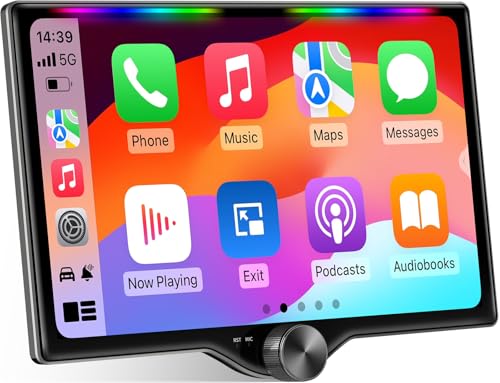
10.1″ QLED Double Din Car Stereo with Wireless Carplay & Android Auto

Pioneer DMH-1600NEX 6.8″ Capacitive Touchscreen Double Din Car Stereo
More Details On Our Top Picks
Audio-focused installs often start here, because this Pioneer skips the screen-heavy approach and stays centered on playback, Bluetooth, USB, and a 13-band equalizer. That kind of layout suits older vehicles where the priority is cleaner sound and dependable source control rather than a tablet-style dashboard.
The 50W x 4 amplifier rating gives the unit enough headroom for many factory-speaker upgrades, while the hi-voltage RCA preouts make later amplification easier. FLAC support matters for anyone carrying lossless files, though the trade-off is obvious, there is no built-in touchscreen map hub or phone-mirroring emphasis here.
What We Like
- Bluetooth, USB, and AM/FM cover the usual daily listening sources without extra fuss.
- FLAC playback supports higher-quality files for drivers who keep a local library.
- The 13-band EQ allows finer sound shaping than basic tone controls.
- Hi-voltage RCA outputs help future amplifier setups stay cleaner and more flexible.
Things To Consider
- There is no built-in touchscreen interface, so phone-dependent navigation lives elsewhere.
- Voice-control support depends on the connected phone and setup choices, not magic.
- Physical-button layouts can feel sparse for drivers who want a larger visual interface.
Core Details
Built With In Mind
Daily commuters who want straightforward sound control and long-term upgrade potential will get the most from this unit. It fits especially well in vehicles where the dash does not need a large display but the audio path does.
Where A Sibling Pick Shines
Pioneer DMH-1600NEX is the better match for drivers who want wired CarPlay and Android Auto in the same Pioneer family.
This Pioneer keeps the footprint sensible with a 6.8-inch capacitive touchscreen and a short chassis, which matters in dash openings that leave little spare depth. Capacitive touch usually feels more responsive than older resistive panels, so menu taps and track changes tend to feel less clunky during a commute.
Backup camera support and steering wheel input compatibility widen its usefulness in real cars, not just idealized installs. Compared with the MVH-S622BS, this one gives up the audio-first hardware emphasis, but it rewards drivers who want a cleaner visual interface without moving to a huge screen.
Highlights
- The short chassis helps in tighter dashboard cavities and awkward retrofit jobs.
- Capacitive touch makes swipes and taps feel more modern than basic button decks.
- Backup camera support is useful for parking in crowded lots or narrow driveways.
- Steering wheel input support keeps common controls within easy reach.
Points To Note
- The 6.8-inch screen is practical, though not as expansive as a tablet-sized unit.
- Drivers wanting deep audio tuning may miss the more feature-heavy audio stack on the MVH-S622BS.
- Touchscreens need regular wiping to keep fingerprints and smudges from piling up.
Feature Snapshot
Who Will Love This
Drivers replacing an older factory radio in a compact dash will appreciate the smaller rear depth and the straightforward screen layout. It also suits everyday vehicles where convenience matters more than a full multimedia showcase.
Another Choice May Suit
Pioneer DMH-1600NEX is a stronger match for drivers who want wired smartphone integration layered on top of a similar Pioneer layout.
This Kissound unit leans hard into modern convenience, starting with wireless Apple CarPlay and Android Auto plus a 7-inch HD display. That combination suits drivers who live on navigation, calls, and streaming apps, because the phone stays in a pocket or bag while the dash handles the interface.
The 240W rating, subwoofer output, and mirror link support point toward a more layered audio and media setup than the simpler Pioneer units above. The honest read is that the feature list is broad enough to feel capable, but the larger stack can take a little more setup attention during installation.
Reasons To Buy
- Wireless CarPlay and Android Auto reduce cable handling during routine driving.
- The 7-inch HD screen gives enough room for maps and media tiles.
- Subwoofer output helps systems with added low-end hardware integrate more cleanly.
- Backup camera support and SWC compatibility expand everyday usefulness.
- Mirror Link can suit phones and apps beyond the main smartphone integrations.
Area To Watch
- Feature depth usually means more setup steps than a simpler radio receiver.
- Mirror Link usefulness depends on device compatibility and app support.
- A screen this prominent calls for careful cleaning to keep glare and smudges under control.
Details At A Glance
Best Suited To
Daily drivers who want wireless smartphone integration and a more feature-loaded screen will get the most from this unit. It suits a busy car where maps, music, and hands-free routine all live in the same place.
Look Elsewhere When
Pioneer MVH-S622BS is the better route for drivers who care more about audio control than touchscreen richness.
Compared with the slightly more feature-dense Kissound above, this model keeps the same wireless phone integration idea but adds a useful spread of ports, including USB-C, AUX, and TF card support. That matters in households or vehicles where media sources are mixed and not everyone runs the same phone setup.
Mirror Link, SWC support, and backup camera compatibility round out a very practical package for everyday commuting. The trade-off is simple, the more connection points a unit offers, the more the installation and cable planning deserve careful attention.
Best Bits
- Wireless Apple CarPlay and Android Auto simplify routine phone pairing.
- USB-C, AUX, and TF support widen source options for passengers and older devices.
- SWC compatibility helps keep frequent controls at the steering wheel.
- Backup camera support suits city parking and tighter garage spaces.
Small Caveats
- The port-rich layout can mean more cable management during installation.
- Wireless phone features are convenient, though they still depend on phone compatibility.
- The screen size is useful, but not as expansive as the 10.1-inch option later in the list.
Core Details
Right Fit For
Drivers who want broad media compatibility without jumping to a giant screen will see the appeal here. It also suits an older car that needs modern phone support without a full dash redesign.
Swap It Out When
Kissound’s 10.1-inch QLED model is the better route for drivers who value a larger display and a more visual dashboard presence.
This Emeito model keeps the familiar 7-inch touchscreen format but adds Bluetooth 5.2, RDS, and a weatherproof backup camera in the feature mix. Bluetooth 5.2 is the newer wireless standard here, which usually means a steadier phone connection path than older revisions in the same class.
The 178 x 102 mm sizing note is worth checking carefully before install, because dash fit matters more than marketing gloss. In a practical sense, this deck makes sense for drivers who want a broad feature spread and a more modern control layout without moving up to the largest screen in the group.
Upsides
- Wireless Apple CarPlay and Android Auto streamline everyday phone use.
- Bluetooth 5.2 supports a more current wireless connection standard.
- RDS, AUX, card slot, and USB give the unit flexible source handling.
- SWC and subwoofer support help it fit into a fuller cabin audio setup.
- The weatherproof backup camera is a useful extra for parking and reversing.
Areas To Watch
- The listed 178 x 102 mm size needs a careful dash match before installation.
- Feature-heavy decks often ask for more setup patience than basic stereos.
- The broad menu set can feel a touch busy until the layout becomes familiar.
Spec Overview
The Right Fit
Drivers who want a balanced mix of wireless smartphone tools, extra inputs, and camera support will find this one easy to place in a daily vehicle. It suits practical installs where flexibility matters more than a giant display.
Where A Sibling Pick Shines
Pioneer DMH-130BT is the cleaner choice for drivers who need a short chassis and a more established brand layout in a tighter dash.
The biggest visual step in this lineup is the 10.1-inch QLED screen, and that size changes the feel of the dashboard immediately. QLED, a quantum-dot display approach, usually points to stronger color handling than basic panels, which matters for drivers who spend a lot of time following maps or flipping through media tiles.
Wireless CarPlay and Android Auto are here too, along with music-sync luminous bar styling, dual subwoofer output, and navigation support. Compared with the 7-inch units, this one is more about screen presence and cabin theater, though a larger panel does ask for a dash that can physically and visually carry it.
Bright Spots
- The 10.1-inch display offers generous space for navigation and split media views.
- QLED panel styling is a strong fit for drivers who want vivid screen presence.
- Wireless phone integration keeps the daily routine simple once connected.
- Dual subwoofer output supports larger audio setups with more routing options.
- The luminous bar adds a distinctive look without changing the core controls.
Honest Caveats
- A larger screen takes more dashboard space than the 6.8-inch and 7-inch picks.
- The visual emphasis may be more than some older vehicles can comfortably frame.
- Touchscreen surfaces benefit from regular cleaning, especially on a panel this large.
Technical Sheet
Whose Shelf It Belongs On
Drivers who want a large, modern display and are comfortable making room for it in the dash will get the strongest fit here. It is especially useful in larger cabins where the screen can match the scale of the interior.
Not Your Match When
Pioneer DMH-130BT makes more sense for tighter dashboards that need a shorter, less imposing unit.
This Pioneer splits the difference between convenience and restraint, with a 6.8-inch capacitive touchscreen, wired CarPlay, wired Android Auto, and Bluetooth. Wired smartphone integration is a good fit for drivers who prefer a stable connection and do not mind plugging in before the drive starts.
Front, rear, and sub RCA preouts make it more flexible than the simpler Pioneer DMH-130BT, especially for people planning an amplifier path later on. The trade-off is that the setup leans more classic than wireless-first models, so it rewards drivers who value dependable connection over cable-free handoff.
Standout Traits
- Wired CarPlay and Android Auto offer a steady smartphone connection path.
- The 6.8-inch capacitive touchscreen keeps the interface clear and manageable.
- Front, rear, and sub RCA preouts support more elaborate audio systems.
- Bluetooth, USB, and AM/FM cover the core media needs of most cars.
- Backup camera support helps preserve useful rear visibility after the upgrade.
Softer Spots
- Wired phone integration means a cable is part of the daily routine.
- The 6.8-inch screen is practical, though less expansive than 7-inch and 10.1-inch rivals here.
- Drivers wanting a wireless-first setup may prefer the Kissound or Emeito models.
Feature Rundown
Who Should Grab It
Drivers who want a dependable Pioneer layout with wired smartphone support and future audio expansion will find a clear match here. It suits a vehicle that spends most of its life on regular commutes and weekend trips.
Reach For A Different Pick When
For wireless smartphone use and a more showy interface, Kissound’s 7-inch HD touchscreen model is the more flexible alternative.
How To Choose The Right Double Din Car Stereos
Start With The Dash, Not The Screen
Fit comes first in this category. A short chassis can save a difficult installation in a shallow dash, while a larger unit such as the 10.1-inch QLED Kissound model asks for more visual and physical room. Screen size should follow the opening, not the other way around.
Panel type matters too. Capacitive touch usually feels faster and more modern than basic resistive touch, while a physical-button deck like the Pioneer MVH-S622BS keeps things simpler for drivers who prefer tactile control.
Match Phone Use To The Drive Pattern
Wireless CarPlay and Android Auto suit commuters who want fewer cables and quick access to maps or music. Wired versions, such as the Pioneer DMH-1600NEX, stay stable and often appeal to drivers who plug in once and leave the connection alone.
Bluetooth still matters even in feature-rich units, because it covers calls and streaming when a phone integration mode is not in use. In a busy car, that fallback keeps the system useful across different devices and passengers.
Think About Audio Expansion Early
Amplifier-ready details usually separate a basic replacement from a longer-term audio build. RCA preouts, especially front, rear, and sub outputs, help an installer route signal to external gear with less hassle, which is why the DMH-1600NEX looks more expansion-friendly than simpler models.
Equalizer controls and subwoofer outputs also matter for ownership beyond day one. A 13-band EQ gives more tuning room than simple bass and treble knobs, while a dedicated sub output or dual sub output can make a bass-heavy setup easier to manage.
Decide How Much Simplicity Still Matters
Not every dashboard needs a feature wall. Drivers who want radio, Bluetooth, and tidy sound control may feel better served by the Pioneer MVH-S622BS than by a full-screen Android Auto unit with more menus and more wiring.
That said, a larger touch interface can reduce friction for families, rideshare use, or long trips where navigation stays on-screen most of the time. The right choice depends on whether the car needs a cleaner control center or a more layered media hub.
What To Weigh Before You Click
Mistakes Worth Dodging
Dash fit gets ignored more often than it should. A 178 x 102 mm unit or a short chassis can save a headache, while a larger 10.1-inch screen may ask for space that older vehicles simply do not have.
Another common miss is buying for screen size alone. A huge display looks appealing, yet a driver who mainly wants stable phone mirroring and simple audio control may be happier with a more restrained Pioneer unit.
The Upgrade Payoff
Higher-tier units usually cost more because of display quality, richer phone integration, and more flexible audio routing. QLED panels, wireless smartphone support, and multiple RCA preouts all add hardware and design complexity.
That extra spend makes the most sense for drivers who treat the car as a daily command center. For lighter use, a simpler radio receiver often covers the same commute with fewer moving parts.
Frequently Asked Questions
What Size Screen Works Best In A Double Din Setup?
A 6.8-inch or 7-inch screen fits many dashboards without dominating the cabin. Larger 10.1-inch units suit vehicles that can physically and visually support the extra size.
Is Wireless Phone Integration Better Than Wired?
Wireless CarPlay and Android Auto remove cable handling and feel convenient for short daily drives. Wired setups stay stable and are often easier for drivers who keep the phone plugged in anyway.
Do RCA Preouts Matter For A Basic Installation?
RCA preouts matter most when an amplifier or added speaker path is part of the plan. For a simple factory-speaker upgrade, they are helpful but not essential.
What Does A Short Chassis Change?
A short chassis reduces rear depth, which can make installation easier in cramped dash spaces. It helps especially in older cars with limited room behind the radio opening.
Is A Touchscreen Worth It Over Physical Controls?
A touchscreen gives more room for maps, media, and menus, which helps in phone-heavy daily use. Physical controls still suit drivers who want quick audio changes without extra visual attention.