

Android phone integration has become the practical baseline for modern dash upgrades. The strongest picks handle navigation, calls, music, camera feeds, and charging without turning the dash into a maze of menus. That matters most for commuters, family vehicles, and weekend drivers who want cleaner control on the road.
Some options replace a factory radio, while others add a portable touchscreen layer over an existing setup. The right choice depends on dash size, wiring comfort, and how much screen space feels natural in the cabin. A careful match saves frustration later.
Quick Look At The Shortlist
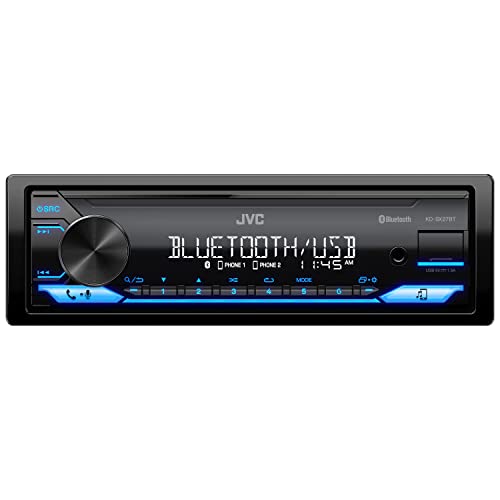
JVC KD-SX27BT Car Stereo

IIWEY iK11 11-Inch Wireless CarPlay Screen
SJOYBRING 7-Inch Double Din Car Stereo

Sobalai Single Din Radio Car Stereo 6.9-Inch

GTVFS 9-Inch Wireless CarPlay Screen

Kissound Double Din Car Stereo 7-Inch

Kissound 7-Inch Double Din Car Stereo
More Details On Our Top Picks
Single-DIN shoppers usually want a clean swap, not a dashboard project, and this JVC fits that brief well. Bluetooth, a front USB port with 1.5A output, AM/FM, AUX-in, and the 13-band EQ give it a familiar, no-drama layout for daily commutes.
Dual phone connection helps in a shared-car setup, especially for households that rotate drivers. The trade-off is obvious, though, since this is a media receiver rather than a full screen-based interface, so Android users wanting map mirroring will likely want a more feature-heavy unit like the IIWEY iK11.
Strong Points
- Bluetooth and dual phone pairing keep phone handoffs simple in a family car.
- Front USB and AUX-in cover older and newer audio habits without fuss.
- 13-band EQ gives more room for tuning than basic tone controls.
- Compact single-DIN format suits older dashboards with limited space.
Points To Note
- No built-in touchscreen, so navigation and app mirroring stay phone-side.
- Wired charging stays modest at 1.5A, which is fine for light top-ups but not quick replenishment.
- Owners replacing a factory screen system may find the interface feel simpler than expected.
Feature Rundown
Who It Suits Best
Drivers replacing an older single-DIN unit with a straightforward audio hub will get the most from it.
Where A Sibling Pick Shines
The Sobalai Single Din Radio Car Stereo 6.9-Inch suits screen-first Android setups better, especially for parking-camera use.
The 11-inch screen is the obvious headline, and the ultra-slim 0.16-inch profile helps it sit cleanly on a dash rather than swallowing it. Wireless CarPlay, Android Auto, a 4K dash cam, 1080p backup camera support, GPS, mirror link, and voice control make it a broad-coverage setup for drivers who want a single command center.
That breadth comes with a little complexity, because more features usually mean more setup decisions and more menu layers. For long commutes or shared vehicles, though, the combination can replace several separate gadgets at once, which is where it feels more capable than the JVC KD-SX27BT.
Upsides
- Large 11-inch display makes map reading and app tiles easier to scan.
- Wireless phone integration removes cable clutter on repeated short trips.
- Built-in dash cam coverage and backup camera support widen its day-to-day usefulness.
- Voice control helps keep common functions close at hand during driving.
- Ultra-slim body should suit cleaner-looking dash installs.
Room For Improvement
- The amount of built-in functionality can take more time to sort out during setup.
- A large external screen may feel oversized in smaller cabins or older cars with tight dash space.
- Portable-style gear often needs a little more cable management to stay tidy.
Core Details
Whose Shelf It Belongs On
Drivers who want a screen-heavy Android-friendly setup without opening the dash usually fit this model well.
Another Choice May Suit
The GTVFS 9-Inch Wireless CarPlay Screen suits smaller cabins and lease vehicles that benefit from a lighter portable layout.
This SJOYBRING unit leans harder into audio output than the first two picks, and that shapes the whole ownership experience. Wireless CarPlay, Android Auto, Bluetooth, a dash cam, MirrorLink, backup camera support, AM/FM radio, and 240W 4.2-channel output make it the more serious sound-and-screen option.
QLED, or quantum-dot LED, usually means richer color handling and stronger contrast than plain entry displays, so the screen has more presence in daylight-driven use. The honest read is that it suits drivers who want media, cameras, and sound in one package, while the JVC still makes more sense for simple audio-first swapping.
Best Bits
- 240W, 4.2-channel output gives the setup a stronger audio backbone.
- QLED screen should feel more vivid than basic budget panels.
- Dash cam and backup camera support add useful parking and road visibility tools.
- Wireless phone integration keeps the dash less cluttered.
- AM/FM radio remains available for drivers who still use broadcast stations.
Softer Spots
- More audio and video features usually mean a little more setup time.
- The larger feature set can feel excessive for drivers who only need basic streaming.
- Screen brightness and menu behavior may matter more in very sunny cabins.
Details At A Glance
Best Suited To
Enthusiast drivers and commuters who want more audio authority from a double-DIN setup will get the most from it.
Look Elsewhere When
The Kissound 7-Inch Double Din Car Stereo is the simpler route for drivers who want fewer layers and a leaner feature mix.
Compact single-DIN installs can feel cramped fast, and this Sobalai layout tries to solve that with a 6.9-inch UHD touchscreen. Wireless Apple CarPlay and Android Auto, Bluetooth, Mirror Link, navigation support, USB-C fast charging, FM/AM radio, EQ, steering wheel controls, and a 1080P backup camera make it unusually complete for the format.
USB-C charging is the kind of detail that matters on long daily routes, since newer cables are easier to live with than old micro-USB clutter. Compared with the JVC KD-SX27BT, this model leans far more into screen interaction and camera support, which is the point for drivers upgrading from basic factory audio.
What We Like
- 6.9-inch touchscreen brings a modern interface to a single-DIN footprint.
- Wireless phone integration helps keep short trips cable-free.
- USB-C fast charging suits newer phone charging habits.
- Steering wheel control support keeps common commands close at hand.
- Backup camera inclusion adds practical parking help.
Small Caveats
- Single-DIN fit still depends on the vehicle dash and install kit.
- Screen-first controls can ask for a little more attention than a knob-heavy radio.
- Owners with very small dashboards may still find the 6.9-inch layout prominent.
Feature Card
The Right Fit
Drivers moving from an older radio to a screen-forward single-DIN system should find this one especially practical.
Reach For A Different Pick When
The IIWEY iK11 11-Inch Wireless CarPlay Screen suits drivers who want a larger display without touching the factory dash.
Portable displays solve a very specific problem: adding modern phone mirroring without opening the dashboard. This GTVFS unit brings a 9-inch touchscreen, wireless CarPlay and Android Auto, Bluetooth, FM, Mirror Link, voice control, GPS navigation, hands-free calling, and plug-and-play setup, so it suits drivers who want flexibility more than permanent integration.
That portability makes it a natural fit for lease vehicles, shared cars, and people who prefer to move gear between vehicles. The trade-off is visible cabling and a dash-mounted look, which is less clean than a built-in double-DIN system such as the Kissound 7-Inch Double Din Car Stereo.
Reasons To Buy
- Portable format avoids a full dash replacement.
- 9-inch screen gives enough room for maps and media controls.
- Wireless connection keeps everyday use uncluttered.
- Voice control and hands-free calling are useful in stop-and-go traffic.
- Plug-and-play style setup suits casual installers.
Areas To Watch
- Portable mounts depend on tidy cable routing to look and feel right.
- Dashboard placement can take some trial to get the viewing angle right.
- The open, add-on style may feel less integrated than a true in-dash unit.
Quick Facts
Built With In Mind
Lease drivers and anyone wanting a removable screen solution will find the format especially easy to live with.
Where A Sibling Pick Shines
The Sobalai Single Din Radio Car Stereo 6.9-Inch fits owners who want a more permanent, dashboard-integrated setup.
Some installs need a middle path, and this Kissound unit sits squarely in that space. The 7-inch HD touchscreen, wireless Apple CarPlay and Android Auto, Bluetooth, 240W output, steering wheel control support, subwoofer output, Mirror Link, FM/AM radio, and backup camera support make it a sensible upgrade for daily driving.
The inclusion of subwoofer output is the detail that separates it from simpler screen receivers, since bass-focused systems need a proper signal path. For drivers who want a dependable feature mix without stepping into the larger IIWEY layout, this one looks like a tidy compromise.
Highlights
- 7-inch touchscreen keeps the interface clear without going oversized.
- Subwoofer output supports more ambitious audio builds.
- Wireless phone integration cuts cable clutter in daily use.
- Steering wheel control support helps preserve familiar driving habits.
- Backup camera support adds parking convenience.
Minor Gripes
- The broader feature set can ask for more setup attention than a basic radio.
- Double-DIN fit still depends on vehicle compatibility and trim space.
- Menu learning can take a short adjustment period for drivers used to knob-only controls.
Core Details
Best Suited To
Drivers planning a fuller double-DIN upgrade with extra audio flexibility will find this model especially fitting.
Skip It When
The JVC KD-SX27BT is the cleaner match for a straightforward, audio-first installation in a smaller dash opening.
This Kissound version keeps the same 7-inch double-DIN idea but trims it toward practical use. Wireless Apple CarPlay and Android Auto, Bluetooth, 240W output, steering wheel controls, subwoofer out, Mirror Link, USB-C, AUX, TF input, FM/AM radio, and backup camera support make it a broad but still sensible dash upgrade.
USB-C, AUX, and TF support widen source options, which helps in older vehicles where mixed media habits still matter. It feels especially useful for households that want a flexible all-rounder, while the SJOYBRING 7-Inch Double Din Car Stereo makes more sense for drivers chasing stronger screen presence and a little more audio ambition.
Best Points
- Multiple input options make it friendlier to mixed media habits.
- Wireless phone support keeps the cabin less cluttered.
- Subwoofer output gives audio systems room to grow.
- Steering wheel control support improves day-to-day usability.
- Backup camera support helps with low-speed maneuvering.
Things To Consider
- More connection options usually mean more setup steps.
- Double-DIN installation still depends on the vehicle’s dash opening and harness fit.
- Owners after a highly polished screen experience may prefer the SJOYBRING QLED model.
At A Glance
Whose Shelf It Belongs On
Drivers who want a flexible, everyday double-DIN setup with multiple media inputs will appreciate it most.
A Better Fit Elsewhere
The IIWEY iK11 11-Inch Wireless CarPlay Screen is the stronger match for anyone who wants a larger dashboard display.
How To Choose The Right Car Stereos For Android Phones
Match The Layout To The Dash
Single-DIN units fit smaller openings and older vehicles, while double-DIN units use a wider face for larger screens and easier menu visibility. Portable screens avoid dash surgery, which makes them attractive for leases or vehicles that need reversibility.
The layout choice affects everything after installation, from cable routing to how much of the cabin the display occupies. A clean fit often matters more than a long feature list, especially in compact dashboards.
Focus On How Android Will Be Used
Android drivers usually care about maps, calls, music, and quick access to apps, so wireless Android Auto support can matter more than flashy audio claims. A screen with voice control and stable touch response feels better for daily commuting than a unit loaded with unused extras.
Phone mirroring, GPS support, and steering wheel controls each solve a different problem, so the best choice depends on which task happens most often. A commuter with frequent navigation needs has different priorities from a weekend driver who mainly streams music.
Think About Camera And Audio Needs Together
Backup camera support is a major convenience in crowded parking lots, but it should not distract from audio output and input options. A model with subwoofer output or stronger wattage suits vehicles heading toward a fuller sound system.
That balance matters because camera features and sound features often sit on opposite ends of the purchase decision. A practical setup solves both, not just one.
Choose For Installation Comfort
Plug-and-play portable units reduce install stress, while wired in-dash systems usually reward drivers who want a cleaner, more permanent result. USB-C, AUX, and TF inputs also make ownership easier because they keep older devices and newer phones in the same conversation.
Maintenance stays simple for most of these picks, but exposed cables, mounts, and touch panels still need a little routine care. A good match looks tidy after the first week, not only on installation day.
Things Worth Knowing First
Hidden Buying Traps
One common mistake is oversizing the screen for the cabin, which can make a small dash feel crowded. Another is overlooking wiring and dash-kit needs, then discovering the install takes more parts than expected.
Portable screens can also tempt a quick purchase, yet the mount, cable path, and visibility angle still need attention. The cleanest-looking setup usually starts with the right format, not the longest feature list.
When Paying More Pays Off
Higher-tier units usually cost more because they combine larger screens, stronger audio output, more camera support, and broader phone integration in one housing. QLED panels, extra inputs, and built-in dash cams also add to the final price structure.
That upgrade makes sense for drivers who spend a lot of time in the car and want fewer separate gadgets on the dash. For short trips and simple audio use, a leaner model can be the more sensible spend.
Frequently Asked Questions
Do these stereos work with Android phones?
Several picks in this list support Android Auto, which is the clearest fit for Android phone use. Others focus on Bluetooth and media playback instead, so the phone experience depends on the model.
Is a single-DIN or double-DIN better for Android use?
Double-DIN units usually give more screen area and easier visual control. Single-DIN units suit tighter dashboards and drivers who prefer a simpler radio-style setup.
Do portable screens need permanent installation?
Portable units are designed to sit on the dash rather than replace the factory head unit. That makes them appealing for lease vehicles and shared cars.
Why does subwoofer output matter?
Subwoofer output gives an audio system a dedicated path for low-end sound. It matters most for drivers building a fuller aftermarket setup.
What matters most for daily commuting?
Stable phone connection, easy controls, and clear screen visibility matter most on routine drives. Backup camera support also helps in packed parking lots and tight spaces.
Closing Thoughts
Car stereos for Android phones now cover a wide spread, from basic media receivers to portable touchscreen command centers. The right choice depends on dash space, install comfort, and how much screen interaction feels useful every day. The JVC stays sensible for straightforward swaps, while the larger screen units make more sense for drivers who want navigation and camera support in one place. A calm, well-matched setup tends to feel right long after the first drive.