


In-car screens and accessories now cover far more than basic audio. Some setups mirror a phone, some play discs for backseat passengers, and others turn a rear seat into a calmer place on long drives.
That mix matters for commutes, family road trips, and older vehicles that never left the wired era behind. The seven picks below focus on fit, features, and the kind of cabin use each item suits best.
Quick Look At The Shortlist

LAMTTO Wireless CarPlay Adapter 3-in-1 Magic Video AI Box

WONNIE 12″ Dual Car DVD Players Portable DVD Players

Volam 11” Wireless Carplay Screen for Car
BKWITY Car Headrest Tablet Holder Lockable 3-in-1 Extension Arm
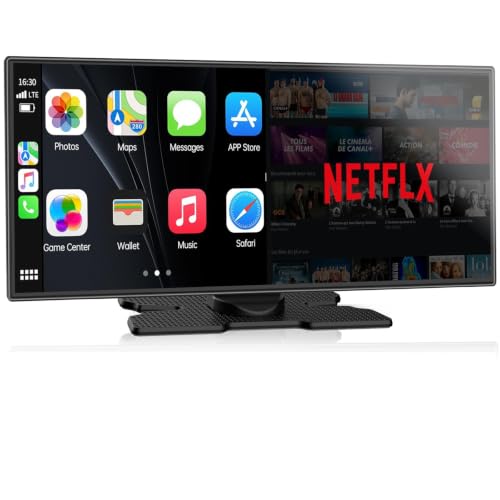
LAMTTO 11” Wireless CarPlay Screen with Backup Camera
LAMTTO Wireless CarPlay Adapter with Gemini AI and Google Play

MENZOKE Kids Travel Tray for Kids Car Seat 2-Pack
More Details On Our Top Picks
Vehicle owners who already have wired CarPlay or Android Auto get the most from this LAMTTO box. Dual WiFi, AirPlay, OTA updates, and USB drive playback give it a broader role than a plain adapter, though that also means setup depends on the head unit and the phone pairing habits.
The trade-off is obvious: more features usually bring more menu depth and a little more fiddling. For daily commuters who want screen mirroring and app-style flexibility without changing the dash, that extra layer can feel worth it.
Highlights
- Combines wireless CarPlay and Android Auto support with streaming-oriented functions.
- Dual WiFi helps keep network handling more flexible in mixed cabin setups.
- AirPlay support suits households that switch between iPhone use and media playback.
- USB drive playback gives offline content a simple path, useful on weak-signal routes.
- OTA updates, meaning over-the-air software updates, can reduce the need for manual refresh steps.
Points To Note
- Feature density can mean a steeper first setup than a basic plug-in adapter.
- Video use depends heavily on the vehicle screen and the way the dash is configured.
- Owners who prefer a very simple interface may find the extra options a bit busy.
Feature Rundown
Who Should Grab It
Drivers with factory wired CarPlay or Android Auto who want a smarter, less cable-heavy cabin fit will get the most from this box.
A Better Fit Elsewhere
LAMTTO 11” Wireless CarPlay Screen with Backup Camera suits drivers who want a larger standalone display rather than an add-on module.
Rear-seat movie time is the clear mission here. Two 12-inch screens let a pair of passengers watch the same film or different ones, which helps on longer drives where shared attention gets thin fast.
The rechargeable battery adds flexibility for short stops or travel days, and the headrest mounting approach keeps the setup familiar. The honest read is that disc-based entertainment feels more old-school than a streaming screen, yet it stays straightforward for families who still own DVDs and want predictable playback.
What We Like
- Two-screen layout supports shared viewing or separate movies.
- 12-inch displays give backseat passengers a roomy picture area.
- Five-hour rechargeable battery supports travel days without constant cord management.
- Mounting brackets help the setup stay organized in the second row.
- All-region playback is useful for households with mixed disc collections.
Small Caveats
- Disc playback suits owners who still keep physical media on hand.
- Headrest mounting takes a little cabin planning, especially in tighter vehicles.
- The battery helps mobility, but long viewing sessions still call for charge awareness.
Details At A Glance
Built With In Mind
Families with children who still watch discs during road trips will benefit most from this layout and battery balance.
Where A Sibling Pick Shines
Volam 11” Wireless CarPlay Screen for Car fits drivers who want a modern touchscreen cockpit instead of a dedicated DVD setup.
This Volam screen pushes closest to a full dash upgrade without the permanence of a built-in head unit. The 11-inch panel, Bluetooth, voice control, GPS navigation, FM support, backup camera support, OTA updates, and Android Auto all point toward a cabin that wants one central place for driving and media.
That broad spec set is useful on long commutes or shared household vehicles, though setup complexity rises with every extra function. Compared with the simpler LAMTTO adapter above, this one asks for a bigger commitment and gives back a more complete screen-based layout.
Upsides
- 11-inch touchscreen format gives the dash a larger visual anchor.
- Built-in GPS navigation helps in areas where phone signal can be patchy.
- Bluetooth and voice control support hands-free interaction patterns.
- Backup camera support improves usefulness for parking-heavy routines.
- OTA updates help keep software maintenance less hands-on.
Worth Noting
- Feature density can take longer to learn than a bare-bones adapter.
- The larger screen makes placement and cable routing more important.
- Cabins that already feel crowded may prefer a smaller module instead.
Spec Overview
Right Fit For
Drivers who want a feature-dense portable screen for daily use, commuting, and family vehicle sharing stand to gain the most here.
Another Choice May Suit
WONNIE 12″ Dual Car DVD Players Portable DVD Players suit households that care more about separate backseat viewing than a central touchscreen.
Not every in-car entertainment setup needs a screen built into the dash. This headrest mount gives backseat passengers a stable place for a tablet, and the lockable design adds a reassuring sense of order during family travel or rides with active kids.
The 180-degree folding extension arm keeps the mount from feeling bulky when folded down, while the 360-degree ball head makes angle changes easy. In a crowded second row, that kind of adjustability matters more than flashy features, especially for households using a tablet as the main media source.
Bright Spots
- Lockable design helps the tablet stay put during normal travel movement.
- 360-degree rotation makes angle changes simple for different seat positions.
- Folding arm reduces bulk when the mount is not in use.
- Fits a wide tablet size range, including common iPad and Fire HD models.
Areas To Watch
- Tablet fit still depends on the exact device case and headrest layout.
- The mount is cabin hardware, so installation takes a little planning up front.
- Families who want built-in playback may prefer a screen-based unit instead.
Core Details
Whose Shelf It Belongs On
Families that already use a tablet for backseat media and want a more secure mounting solution are the clearest fit.
Swap It Out When
LAMTTO 11” Wireless CarPlay Screen with Backup Camera fits cabins that need a dedicated display rather than a tablet holder.
Built around an 11-inch display, this LAMTTO unit leans into a more complete cabin hub than the smaller adapter-style picks. Custom UI, split screen, voice assistant support, dual WiFi, backup camera support, and broad mobile compatibility make it feel aimed at drivers who want fewer separate accessories.
The split-screen approach is handy for navigation and media side by side, though the added flexibility can ask more of the setup process. For drivers replacing a dated dash unit, that trade-off makes sense more often than not, especially in vehicles that spend a lot of time on mixed city and highway routes.
Reasons To Buy
- Large 11-inch screen gives the dashboard a cleaner focal point.
- Split screen can keep navigation visible while media stays active.
- Voice assistant support helps reduce menu tapping while driving.
- Dual WiFi adds flexibility for network-heavy use cases.
- Custom UI makes the interface feel more tailored than a basic generic screen.
Room For Improvement
- Screen-based systems usually ask for more installation attention than simple adapters.
- More interface layers can mean a longer adjustment period at the start.
- Cabins that only need phone mirroring may find the extra functions unnecessary.
Feature Snapshot
The Right Fit
Drivers who want a larger portable screen with navigation, media, and backup-camera support in one place are the clearest match.
Look Elsewhere When
BKWITY Car Headrest Tablet Holder Lockable 3-in-1 Extension Arm suits families that only need a secure tablet mount for the back row.
This LAMTTO unit leans hard into app access, which is why the 4GB plus 32GB memory spec matters. That storage and memory pairing gives downloaded streaming apps, games, HDMI input, AirPlay, USB drive playback, and OTA updates more room to function as part of a true media hub.
For households that like long waits to feel shorter, the broader app stack can be appealing. The catch is that a more versatile box tends to ask for more setup patience, so it suits tech-comfortable drivers better than anyone who wants a bare-minimum plug-in.
Best Bits
- 4GB plus 32GB gives the unit more breathing room than tiny plug-in dongles.
- Google Play support opens the door to a wider app selection.
- HDMI and USB playback add useful input flexibility.
- AirPlay support helps iPhone households share media more easily.
- OTA updates reduce the feeling of a static, fixed-function box.
Softer Spots
- App-heavy gear usually takes longer to configure cleanly.
- More features can mean more temptation to tinker during the first week.
- Drivers who only need wireless phone mirroring may not use the deeper app layer.
Feature Card
Made For
Tech-forward commuters and families that want a flexible app-based cabin hub will get the most value from this setup.
Reach For A Different Pick When
WONNIE 12″ Dual Car DVD Players Portable DVD Players suit families that prefer straightforward disc playback in the rear row.
This tray set shifts the category in a useful direction, because entertainment in the car is often really about keeping little hands organized. The tablet holder, dry erase board, and cooler cup holder give kids a place to draw, snack, and watch in one compact surface, which can make long drives feel less chaotic.
The two-pack format suits families with more than one child, or households that want a spare on hand. It does take up seatback space, so smaller cabins may feel the footprint more sharply than larger SUVs or minivans.
Plus Points
- Tablet holder keeps a screen positioned for backseat use.
- Dry erase board adds a low-mess activity option for travel days.
- Cooler cup holder gives drinks a more stable place than a lap or seat pocket.
- Two-pack format works well for families with multiple children.
Minor Gripes
- Tray-style gear takes more cabin room than a simple mount.
- Storage becomes a little more involved once both trays are in the car.
- Families focused only on media playback may prefer a screen-based pick instead.
Core Details
Best Suited To
Families with young passengers who need a more organized backseat setup during trips and errands are the clearest fit.
Skip It When
BKWITY Car Headrest Tablet Holder Lockable 3-in-1 Extension Arm suits cabins that only need a compact tablet mount with less surface footprint.
How To Choose The Right In Car Entertainment
Match The Format To The Cabin
Screen adapters, portable displays, DVD players, tablet mounts, and kid trays solve different cabin problems. A wired CarPlay upgrade suits a driver who wants phone mirroring and easier navigation, while a headrest DVD setup makes more sense for backseat movie time.
The right format depends on who sits where and how long the vehicle stays in motion. A commuter usually wants quick access and clean integration, while a family vehicle often needs rear-seat visibility and fewer cables in the middle row.
Check The Input And Compatibility Story
Compatibility should lead the decision, not follow it. A wireless adapter only pays off when the factory system already supports the underlying phone link, while a tablet mount depends on the tablet size, case thickness, and headrest shape.
For portable screens, operating system support and connection type matter just as much as panel size. The practical question is simple: whether the unit fits the phone, vehicle, or tablet already in use without turning the cabin into a cable puzzle.
Weigh Convenience Against Setup Depth
Basic mounts and simpler adapters usually install faster and ask for less learning. App-rich boxes and larger touchscreens offer more features, yet they can turn first-time setup into a longer afternoon.
That trade-off shows up most in shared vehicles, where several drivers need the interface to feel obvious. Fewer functions can be a strength in a household that wants quick handoff between school runs, errands, and weekend trips.
Think About Power, Storage, And Rear-Seat Use
Battery life, mounting style, and how much cabin room the accessory takes up all affect daily satisfaction. A portable DVD player with a rechargeable battery suits road-trip days, while a tray or tablet mount may be easier to live with around children.
For long-haul drives, rear-seat comfort matters as much as screen size. A well-placed mount can feel as important as the screen itself, because a stable angle saves repeated adjustments and keeps the second row calmer.
What To Weigh Before You Choose
Hidden Buying Traps
Feature lists can hide the real fit problem. A driver may end up with an app-heavy screen when a simple mirroring adapter would do the job, or a family may choose a tray that crowds an already tight second row.
Size, mounting method, and actual cabin layout deserve a close look before any order. The cleanest setup is the one that matches the vehicle first and the spec sheet second.
The Upgrade Payoff
Higher-tier models usually cost more because they combine display hardware, software layers, more memory, or broader media support. Those additions make sense for drivers who treat the car as a daily command center rather than a place for one simple task.
The upgrade is easiest to justify in vehicles used for commuting, shared family travel, or long routes where navigation and media both matter. For short local trips, a simpler accessory often keeps the cabin cleaner and easier to manage.
Frequently Asked Questions
Which Type Of In Car Entertainment Works Best For Families?
Families with backseat passengers usually get the most from headrest DVD players, tablet mounts, or kid trays. The best fit depends on whether the priority is movie playback, tablet use, or a multi-use surface.
Do Wireless CarPlay Adapters Work In Every Car?
Wireless adapters only suit vehicles that already have wired CarPlay or Android Auto support built into the head unit. Compatibility should be checked before anything else, because the adapter does not replace the factory system.
Are Portable Car Screens Hard To Install?
Portable screens are usually less permanent than a full dash replacement, but setup still takes attention. Cable routing, power placement, and dashboard space all affect how tidy the result looks.
Is A Tablet Mount Enough For Backseat Entertainment?
A tablet mount is enough for many households, especially where a tablet already handles video apps or downloaded shows. It works best in vehicles with enough headrest clearance and enough room for the mounted device.
What Helps A Travel Tray Stand Out?
A strong tray combines screen support with practical extras such as a drawing surface or drink holder. That mix makes it useful for more than one type of road-trip activity.